Electrical connection

Wiring recommendations

To ensure the reliability of electrical connections it is recommended to use copper stranded cables, the ends of which should be carefully cleaned and tinned. Otherwise use cable lugs before connection. Cable conductors should be stripped so that their bare ends do not protrude beyond the terminal strip after connecting to the device. The cable cross section must be not more than 1 mm2.

General requirements for connection lines:

  • During the cabling, communication lines that connect the Device with sensors must be isolated to a separate circuit (or several circuits) and placed separately from power cables or other sources of high-frequency and impulse interferences;

  • To protect the Device inputs from the effects of industrial electromagnetic interference, the communication lines between Device and sensors should be shielded. Special cables with shielding or grounded steel pipes of suitable diameter can be used. The cable shielding should be connected to the functional ground terminal (FE) in the control panel;

  • Network interference filters should be installed in the power supply lines;

  • Spark-fighting filters should be installed in the switching lines of power equipment.

When installing the system in which the Device operates, you should follow the rules for effective grounding:

  • all grounding lines must be laid in Y-connected circuit, ensuring good contact with the grounding element;

  • all earthing circuits must be made with wires of the largest possible cross-section;

  • it is forbidden to connect the device terminal "Common" with grounding lines.

Getting Started

Caution
After unpacking the device, make sure that it has not been damaged during transportation.

If the Device was kept for a long time at a temperature below minus 20 °С, then before turning it on and starting work, it should be kept in a room with a temperature corresponding to the operating range for 30 minutes.

To connect Device:

  1. Connect the Device to a power source.

    Danger
    Before applying power to the Device, check that the supply voltage and its level are correct.

  2. Connect primary transducers to the Device inputs.
  3. Connect actuators to the Device outputs.
  4. Apply power to the Device.
  5. Set up the Device.
  6. Power off the Device.

Pin assignment

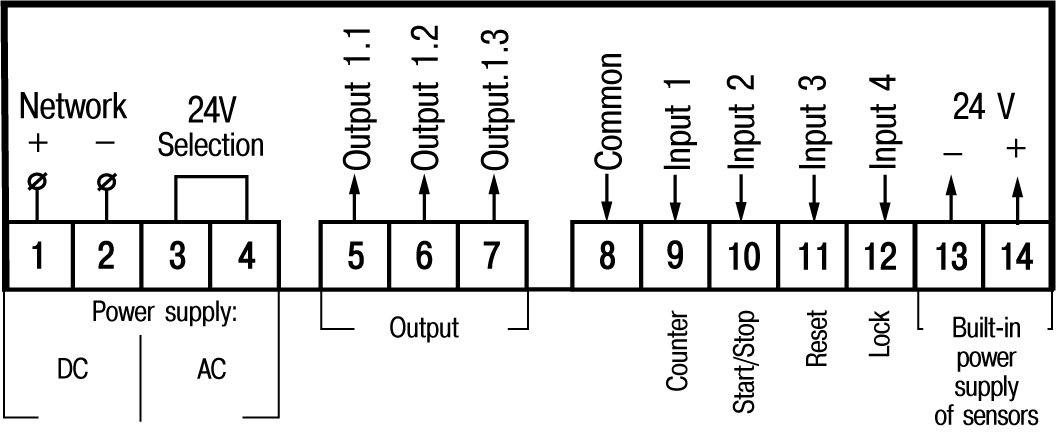
Screw terminals are located on the back wall (panel-mounting) or inside the device (wall-mounting).

The terminal block contacts assignment is shown in Figure.

Graphic
Pin assignment
Danger

If the device is powered from a DC voltage network, then terminals 3 and 4 of the screw terminal block must be interconnected by a jumper.

Connection of switching devices and sensors

Danger
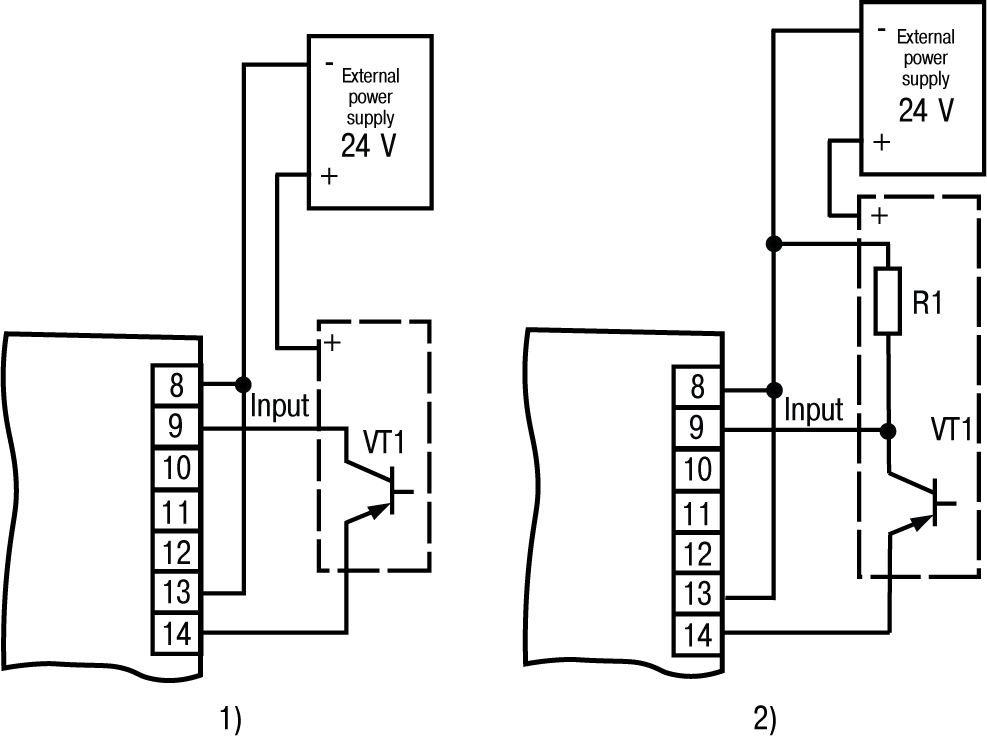
Inputs of the Device (pins 9 – 12 at the terminal block) support supply voltage from 0 to 24 V. Any voltage out of this range is prohibited.
Notice
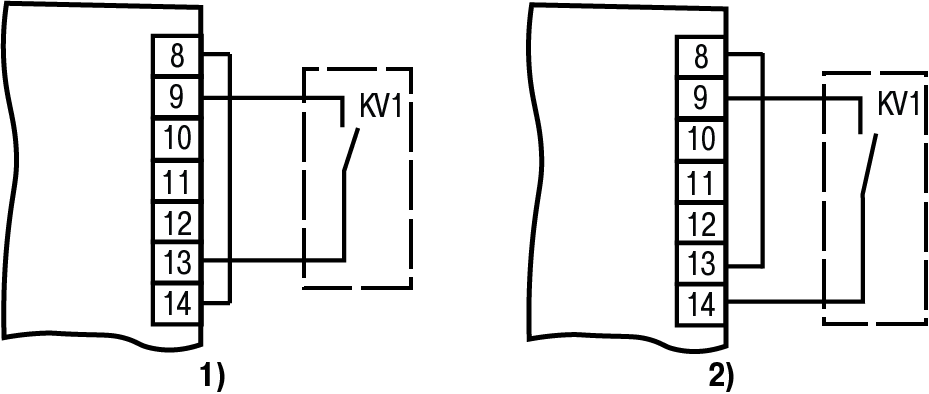
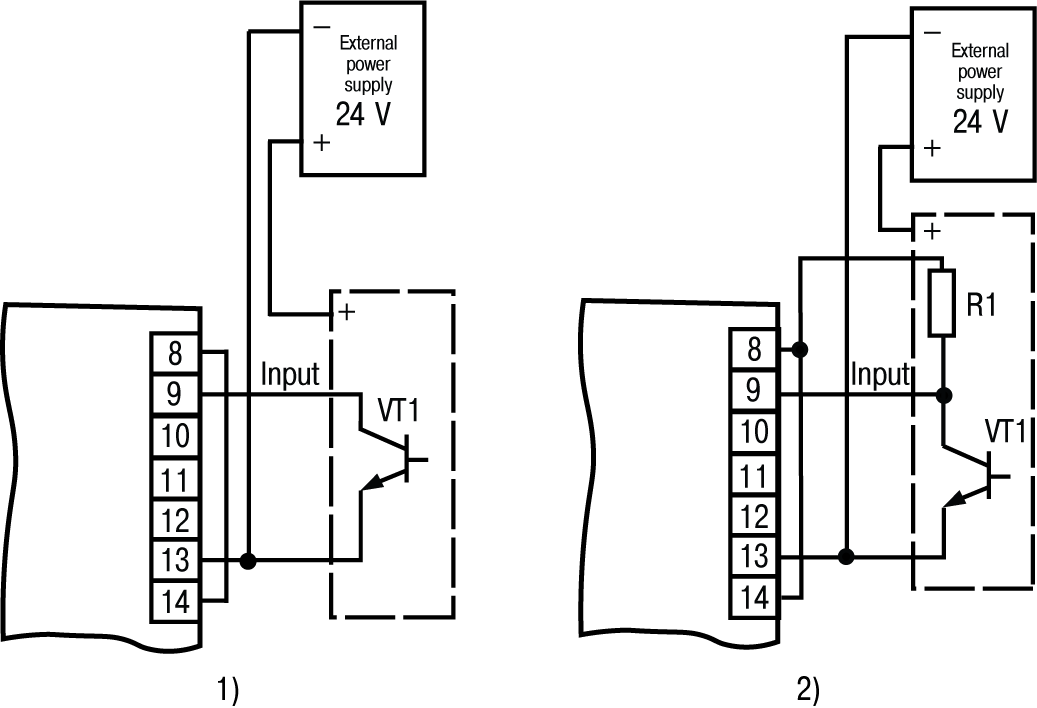
To supply switching devices and sensors to the screw terminal block of the device, the supply voltage is derived (pins 13 and 14 of the terminal block). If power consumption of input exceeds the load capacity of the built-in power supply (24 V), then an external power supply with an output voltage of 12 to 34 V (24 V recommended) must be used for powering.

Scheme for connection of the switching devices to the inputs is shown in Figure.

Graphic
Connection of switching devices: a) for operation with n-p-n sensors; b) for operation with p-n-p sensors

Scheme for connection of passive and active sensors with an output n-p-n open-collector transistor or p-n-p is shown in Figures and accordingly.

Graphic
Connection of n-p-n-sensors: 1) active; 2) passive
Graphic
Connection of p-n-p-sensors: 1) active; 2) passive

Connecting load to the outputs

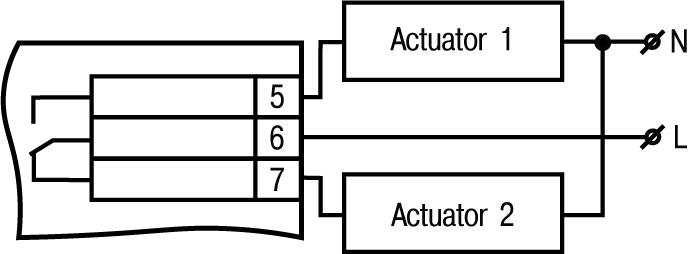
Outputs can be made in the form of electromagnetic relays (P), transistor (K) or triac (C) optocouplers. The outputs are used for direct load control (on/off) or for control by more powerful elements: contactors, solid state relays, thyristors or triacs. The outputs are galvanically isolated from the circuit of the Device.

Scheme of connecting the load to the electromagnetic relay is shown in Figure.

Graphic
Scheme of connecting load to the output of type Р

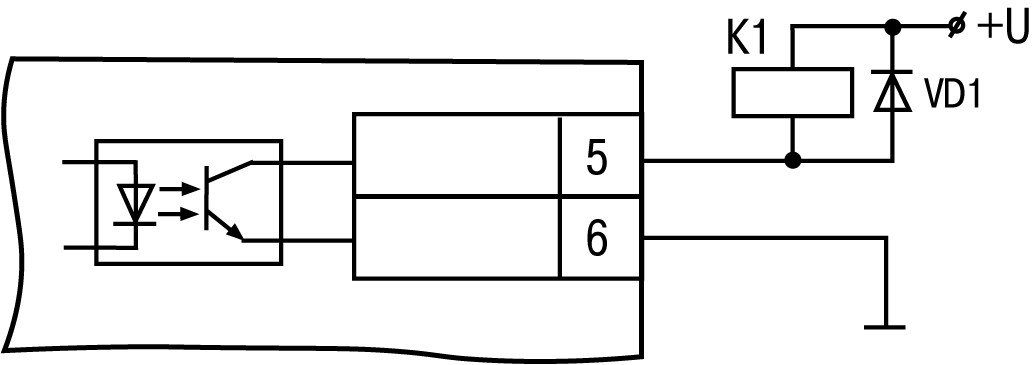
A transistor optocoupler is usually used to control a low-voltage relay (up to 50 V), see Figure.

Danger
In order to avoid failure of the transistor due to the large self-induction current, it is necessary to install a VD1 diode (KD103 or similar type) in parallel to the relay coil.
Graphic
Scheme of connecting load to the output of type K

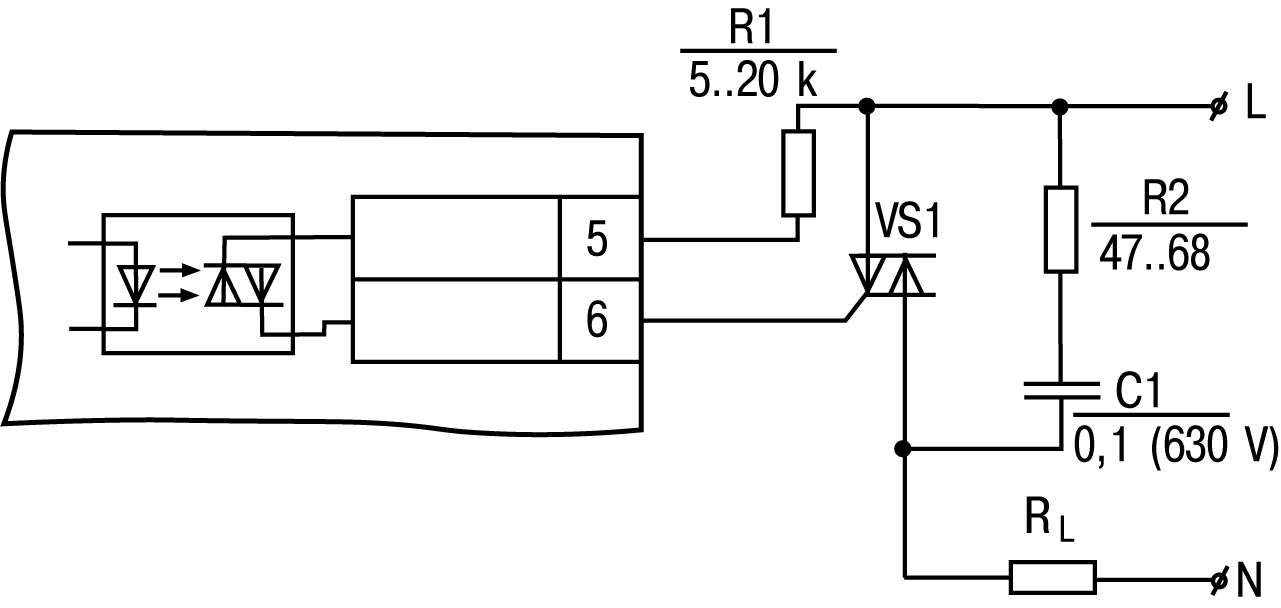
The optosimistor is connected to the control circuit of the power triac through the limiting resistor R1 according to the scheme shown in Figure.

Notice
Nominal value of the resistor determines the current of the triac.
Graphic
Scheme of connecting a power triac to the output of type C

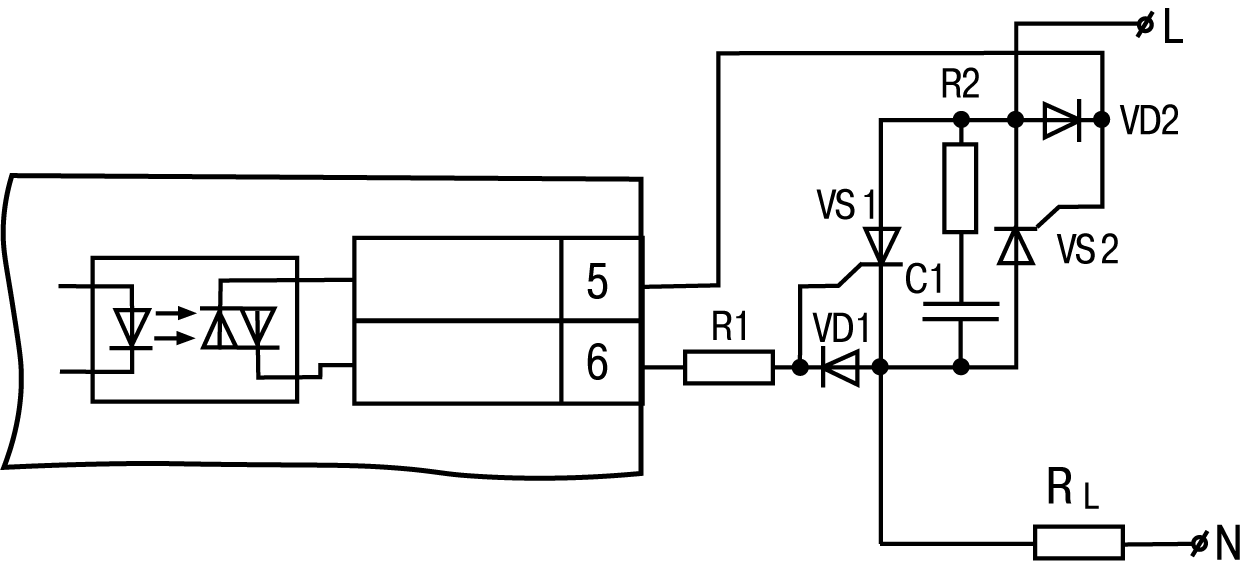
Optosimistor can also control a pair of anti-parallel connected thyristors (see Figure).

Graphic
Scheme of connecting two anti-parallel connected thyristors to the output of type С
Danger
It is recommended to connect a filtering circuit (RC) to the terminals of thyristors or triacs in order to prevent breakdown due to high-voltage power surges in the network.